
mFinley
The money app that never sees your bank.
mFinley is a privacy-first expense tracker by MoonProduct: local-first, no bank login, no ads, no data sale. Track manually or with optional AI on your own key.
Product preview
See it in action
Six things mFinley does for you, every day.
Six screens. One privacy-first money app built around what you actually do with money — track by hand or with optional AI on your own key, surface anomalies, and project the path forward without daily logging fatigue.
AI suggestions
Ask anything. Get answers from your money.
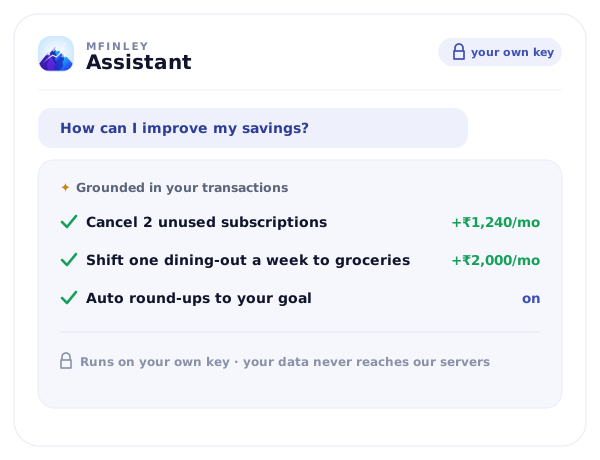
Connect your own AI key and ask “How can I improve my savings?” — mFinley answers with a plan grounded in your actual transactions, goals, and net flow, not a generic article. The AI is optional and runs on your key, so your data goes to your AI provider, never through us — and every answer ends in a one-tap action.
Net flow
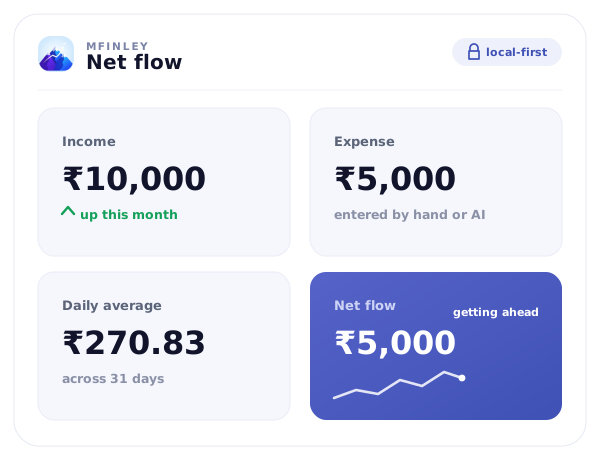
The four numbers that tell you if you're getting ahead.
Income, expense, daily average, net flow. mFinley keeps them visible at all times so you never have to dig — and so every AI suggestion sits on a real baseline, not a vague feeling.
Monthly analysis
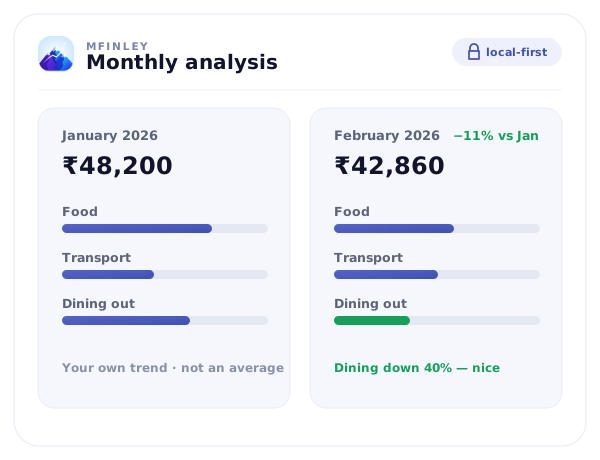
Reviews that compare you to past you.
Every month, mFinley reviews your spend against your own trend — January vs February, category-by-category, year-over-year. Patterns surface automatically; you skip the spreadsheet and fix what changed.
Goal tracking
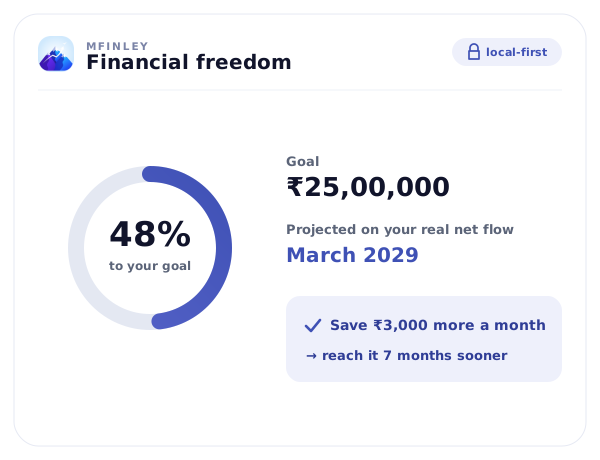
Project your path to financial freedom.
Set a goal; mFinley projects when you'll hit it based on your real net flow. It tells you exactly how much extra to save (or where to cut) to get there sooner — turning intent into a timeline, not a wish.
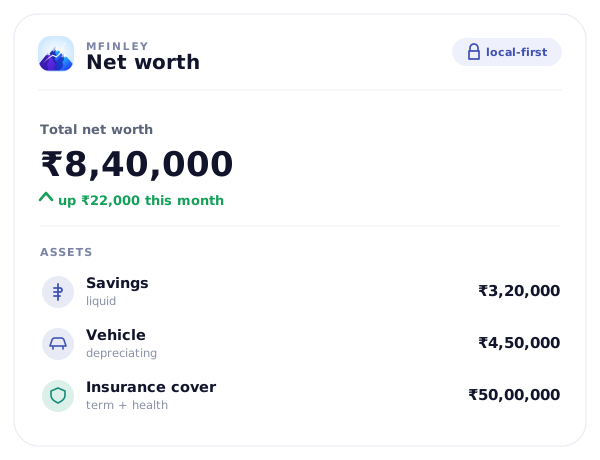
Net worth & assets
Track what you own, not just what you spent.
Log your vehicles, insurance, and savings alongside the day-to-day. mFinley keeps the net worth picture current and analyses the long-term trajectory, not just this month's spend. Spending discipline plus net-worth visibility is what compounds.
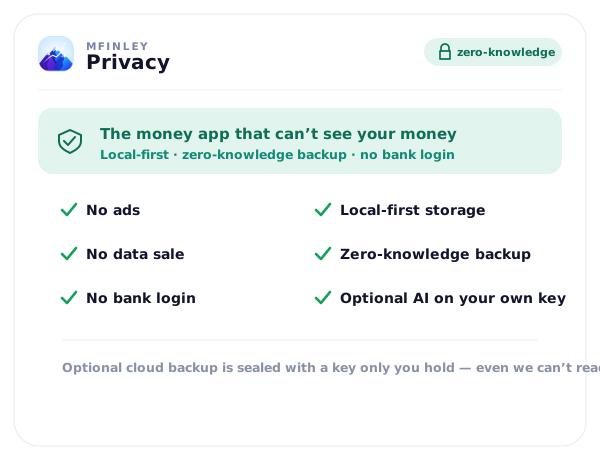
Privacy
The money app that never sees your bank.
No ads. No data sale. No bank login. Your data is local-first and stays on your device; optional cloud backup is encrypted when you set a backup password. The AI is optional and runs on your own key — your transactions go to your AI provider, never through our servers. This is the privacy posture every money app should have started with.
New to mFinley? Read the mFinley fact sheet: what it is, who makes it, and how your data is handled.
Features
Key features
Local-first & private
Expense and income tracking
Budget and net worth management
Recurring expense engine
Optional AI on your own key
Goal and milestone tracking
Cloud backup and restore
Use cases
Who it's for
Popular
Individuals & families
Expense tracking
More use cases
Recurring bills & subscriptions
Savings goals
Why mFinley exists
Most finance apps want your bank login — and quietly monetise the data behind it. mFinley is built the opposite way. Your transactions, budgets, and goals live on your device (local-first), an optional cloud backup is encrypted when you set a backup password, and there's no bank linking, no ads, and no data sale. Want AI? You bring your own key — your data goes to your AI, never through us. Set a backup password and even your cloud backup is unreadable to us.
How it works
Add what comes in and goes out — your way
Add the rest of your money picture
Add optional AI on your own key
Decide what to do next
Pricing
Choose the plan that fits.
Local-first · no bank login · no ads, no data sale
FREE
₹0
- Expense and income tracking
- Categories, search and filters
- Monthly dashboard, spending chart and budgets
- CSV import/export and local backup
- Optional AI on your own key (bring your own Gemini key)
- Cloud backup (encrypted if you set a backup password)
- Local-first storage (data stays on your device)
PRO
₹149 / month · ₹999 / year
- Everything in Free
- Year view and trends
- Net-worth history
- Goal and milestone tracking
- Fin Freedom Simulator
- Assets, vehicles and insurance tracking
- Unusual-spending alerts and recurring-payment detection
7-day free trial on the yearly plan. Subscribe in the mFinley Android app through Google Play; cancel anytime in Google Play.
How it compares
mFinley vs the alternatives
Honest head-to-head pages on the questions buyers actually ask before switching.
mFinley vs Money Manager
Two private, offline trackers — manual at the core, with mFinley's optional AI on top.
vs MintmFinley vs Mint
The honest 2026 alternative for ex-Mint users — a private dashboard, no bank linking, no aggregator fragility.
vs YNABmFinley vs YNAB
Visibility without the envelope tax — private, flexible tracking vs the YNAB methodology grind.
vs MonefymFinley vs Monefy
Monefy is fast and simple. mFinley adds no ads, a web app and a private path to net worth and goals.
vs Money LovermFinley vs Money Lover
Money Lover offers bank sync in some countries. mFinley never links to banks, shows no ads and keeps data on your phone.
FAQ
Answers at a glance.
What is an AI finance app, and is mFinley one?
An AI finance app uses machine learning to handle work you'd otherwise do by hand — answering questions about your spending, reading a statement, or suggesting categories. mFinley offers this, but as an option, not the foundation: the core is private manual tracking, and AI only runs if you connect your own API key (Google Gemini). When you do, your data goes from your device straight to your AI provider — it never passes through mFinley's servers. So "AI-powered" here never means "we read your transactions." Unusual-spending alerts and recurring-payment detection don't need AI at all: they're rule-based and part of mFinley Pro.
How is mFinley different from regular expense trackers?
It's built privacy-first. Your data lives on your device (local-first), optional cloud backup is encrypted when you set a backup password, and there's no bank login, no ads, and no data sale. Most trackers want your bank credentials; mFinley never asks for them. Your data leaves your device only if you turn on cloud backup (encrypted when you set a backup password) or the optional AI on your own key.
Can mFinley replace traditional money manager apps?
Yes. mFinley covers the full manual money-manager experience — expense and budget tracking, categories, goals, and net worth — and works offline with your data kept on-device. On top of that, you can add optional AI insights on your own key whenever you want them.
Does mFinley support goals and net worth tracking?
mFinley includes goals, asset tracking, budget history, and net worth views so users can monitor both daily spending and long-term progress.
Is my data backed up?
By default everything stays local-first on your device. Backup is opt-in: an optional cloud backup, encrypted when you set a backup password. If you set one, restore uses the same password.
What is the best expense tracker app?
The best expense tracker is the one you'll open every day and trust with your data. mFinley works offline, keeps your data on your device, needs no bank login, and never runs ads or sells data. Add optional AI — on your own key — only if you want to ask about your spending or import statements faster.
Are budgeting apps safe?
Modern budgeting apps are safe when they encrypt data, never resell it, and let you export or delete everything on demand. mFinley never resells your data and lets you export or delete everything, keeps your data on your device (local-first), never asks for your bank login, and encrypts the optional cloud backup when you set a backup password. Optional AI runs on your own key, so AI requests never pass through us.
How does AI help track expenses in mFinley?
If you connect your own Gemini key, you can ask mFinley questions about your money ("How can I improve my savings?"), import a bank statement as a PDF or CSV, and get category suggestions for your transactions. The AI is optional and runs on your key — your data goes to your AI provider, never through mFinley's servers. Unusual-spending alerts and recurring-payment detection don't use AI: they're rule-based, part of mFinley Pro, and work without any key.
Can I export mFinley data to Excel or a spreadsheet?
Yes — every transaction, budget, and report can be exported to CSV or Excel. People often start with a spreadsheet and graduate to mFinley once the manual entry stops scaling, but the door back to a spreadsheet is always open.
What is the best budgeting app in 2026?
The best budgeting app is the one that fits how you actually handle money — and, increasingly, the one that respects your privacy. mFinley fits the privacy-first bucket: you add data manually, by CSV, or by snapping a statement; it stays on your device; there's no bank login; and optional AI (on your own key) handles the edge cases. If you've outgrown a spreadsheet but don't want an app reading your bank, mFinley is built for you.
Is mFinley a good Mint alternative?
Yes — for the part of Mint people actually miss: a single private dashboard for spending, budgets, and goals. The difference is the part that killed Mint. Mint linked your banks, and that aggregation is fragile and costly to keep running. mFinley deliberately doesn't link banks — you add data manually, by CSV, or by photographing a statement — and it all stays on your device. No bank login, no ads, no data sale.
How is mFinley different from Money Manager?
Both are privacy-friendly, offline-first manual trackers — neither links your bank. The difference is what sits on top: mFinley Pro flags unusual spending and detects recurring payments without any AI key, and you can connect your own AI key to ask questions, import statements and get category suggestions. Money Manager (Realbyte) is purely manual.
Is Money Manager app safe? Are AI personal finance apps safe?
Modern money manager apps are safe when three things hold: data is encrypted, the app never sells your information, and you can export or delete everything any time. mFinley keeps your data on your device (local-first), has no ad model and no data sale, offers one-tap CSV export, encrypts the optional cloud backup when you set a backup password, and never asks for your bank login. Its AI is optional and runs on your own key, so AI requests never pass through our servers.
Does mFinley work outside India? What currencies are supported?
Yes. mFinley works globally on web and Android. The app supports multiple currencies including USD, EUR, GBP, AUD, CAD, and INR — you set your base currency on first run and mFinley adapts category names, date formats, and number formats accordingly. Optional AI (on your own key) works across English-language transaction text.
Is mFinley free?
mFinley's core is free forever: manual expense and budget tracking, local-first, with no ads and no data sale — and optional cloud backup (encrypted when you set a backup password) and optional AI on your own key are free too. Pro (₹149 a month or ₹999 a year, through Google Play in the Android app) adds year view and trends, net-worth history, goals, the Fin Freedom Simulator, unusual-spending alerts and recurring-payment detection — never your data as the product.
What is an AI-powered personal finance app?
An AI-powered personal finance app uses machine learning to do work you'd otherwise do by hand — answering questions about your spending, reading a statement, suggesting categories. mFinley keeps this optional: AI runs only if you connect your own API key, and your data goes from your device to your AI provider, never through mFinley's servers. Privacy stays the default; AI is the add-on.
Is mFinley a YNAB alternative?
Yes, with a different philosophy. YNAB (You Need A Budget) requires you to assign every dollar a job — a strict zero-based system. mFinley is more forgiving: it tracks what you actually spent and surfaces overspending as it happens, without requiring you to pre-budget every category to the rupee or dollar. People graduate from spreadsheets to mFinley; people graduate from YNAB to mFinley when the discipline overhead stops being worth it.
Privacy-first money app
Put mFinley to work.
The money app that never sees your bank.
Local-first · no bank login · no ads, no data sale
Follow the MoonProduct journey →